

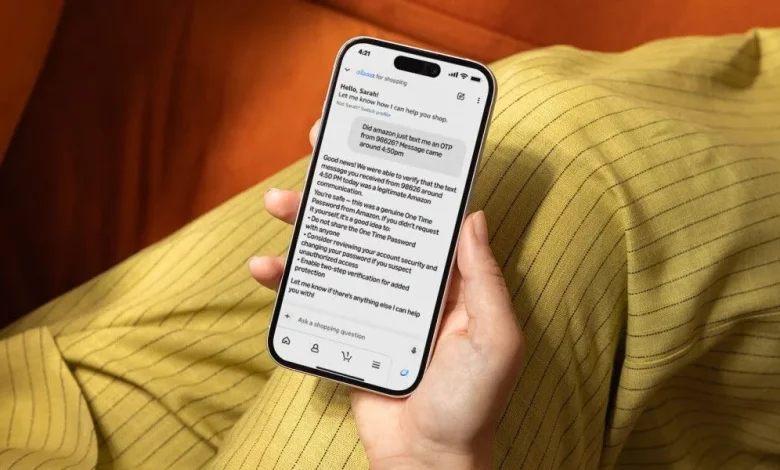
Amazon has introduced a new security tool in the US: users can now ask Alexa for Shopping whether a message, email, phone call or SMS they have received really came from Amazon. A response is provided within a few seconds.
According to the company, around 360,000 customers contact support every year with the same question: whether a suspicious message is genuine. The new service is designed to simplify this check and reduce the number of successful scams in which fraudsters pose as Amazon.
Alexa for Shopping is already used to search for products, compare offers and manage the basket in a live, conversational format. A communication verification feature has now been added to these capabilities. The service analyses data about the sender, the content, the time sent and the formatting of the message, cross-checking them against an internal register of billions of official messages that Amazon sends worldwide. Only when the system is completely certain does it confirm that a message is genuine.
To use the verification feature, the user needs to tell Alexa for Shopping where the message came from, when exactly it arrived and what it said. The tool then provides one of three responses: that it is an official Amazon communication, that the message does not match any known correspondence from the company, or that the service cannot confirm it. In every case, the user also receives safety advice and recommendations on what to do next.
For example, you can ask Alexa for Shopping whether Amazon sent an SMS about a delivery problem, whether an email about a Prime subscription is genuine, whether a call about a refund was from a company representative, or whether a particular phone number or WhatsApp message belongs to Amazon.
If the tool confirms that the message is genuine, it specifies the type of communication, the source, the date and time, and suggests additional steps to protect the account, including setting up two-step verification or passkeys. If the message does not match any official communication, the user is advised not to follow any links, not to reply to the sender, to check their orders directly in the Amazon app and, if necessary, to contact support via the official website.
In cases where the service cannot definitively confirm the origin of a message, Alexa for Shopping suggests providing more details or using alternative verification channels, such as forwarding the suspicious message to verify@amazon.com.
Every request to Alexa for Shopping to verify a communication is automatically forwarded to the Amazon team responsible for customer protection and fraud prevention. These reports help identify new scams, block malicious actors and strengthen protection for other users.
The Alexa for Shopping verification tool complements existing options. Previously, Amazon launched the email address verify@amazon.com, where anyone in the world, even if they are not a customer, can forward a suspicious message and receive a response on whether it is genuine. There is also a dedicated form available on Amazon support pages that allows users to enter details of a communication themselves and instantly receive the verification result.
Amazon stresses that it never asks customers to provide their password, one-time codes or other sensitive data over the phone. The company also warns people to be wary of “urgent” demands, payment via gift cards and any requests to make a payment over the phone or by email.
Alongside the new tools, Amazon is investing in preventive measures: it blocks millions of suspicious calls, informs hundreds of millions of users about safe practices and works with organisations such as the Better Business Bureau in the US, where a joint Scam Tracker service operates to search for and check suspicious emails, URLs and phone numbers.
The Alexa for Shopping verification tool has so far been launched in the US, but Amazon plans to roll it out gradually to other regions. At the same time, users around the world can already forward suspicious messages to verify@amazon.com or use the online verification form on the support pages.