

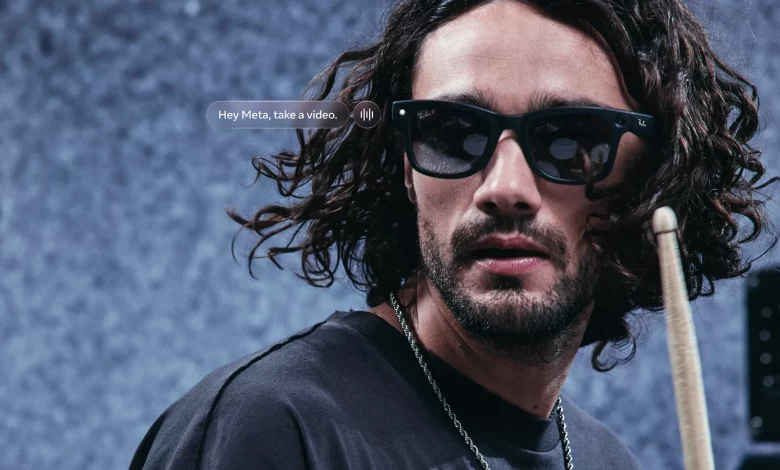
Meta AI glasses let you shoot first-person (POV) video without a smartphone in your hand — while travelling, at concerts or during outdoor activities. The camera is built into the frame, so recording captures the scene just as you see it with your own eyes.
Under the Ray-Ban Meta, Oakley Meta HSTN, Oakley Meta Vanguard and Meta Ray-Ban Display brands there are models with video recording, stabilisation, full voice command support and various recording modes.
To start recording manually, there is a shutter button on the right arm, next to the hinge. To begin shooting video, press and hold it until the white indicator lights up. On the Meta Ray-Ban Display model, a preview of the frame also appears on the display. To stop the video, simply press the button again — the indicator switches off and the clip is saved to the glasses’ internal storage. Viewing, editing and publishing are available via the Meta AI mobile app, while on Meta Ray-Ban Display basic preview is available directly on the glasses.
The second way to control them is by voice via Meta AI. After activation with the phrase “Hey Meta”, the glasses respond to commands such as “Hey Meta, take a video” to start recording or “Hey Meta, stop” to end it, confirmed by the white indicator switching on or off. You can shoot slow-motion video (“Hey Meta, take a slo-mo video”), use 3K Ultra HD mode (“Hey Meta, take a 3K video” — available on Oakley Meta HSTN, Oakley Meta Vanguard and Ray-Ban Meta Gen 2) and create time-lapses with the command “Hey Meta, start a hyperlapse” (supported on Oakley Meta HSTN, Oakley Meta Vanguard, Ray-Ban Meta Gen 1 and Gen 2).
For the Meta Ray-Ban Display model, zooming during shooting has been added — the phrases “Hey Meta, zoom in” or “Hey Meta, zoom out” change the field of view. This can also be done with gestures using the Meta Neural Band: pinch your index and middle fingers together and rotate your wrist to the right to zoom in, to the left to zoom out.
To get high-quality POV clips, the manufacturer recommends using the built-in stabilisation, as well as the slow motion and hyperlapse modes. Slow motion lets you emphasise fast movements, while a time-lapse compresses long events — for example, a sunrise or a walk around the city — into short, dynamic clips.
It is important to experiment with angles: tilt your head, crouch down, change the height of your gaze to capture unusual perspectives. Paying attention to composition in the frame makes the video more expressive and immersive.
Lighting plays a distinct role. It is best to shoot in natural daylight, although the glasses’ automatic systems adjust exposure and brightness on their own. It is advisable to avoid strong backlighting, to face the light source, or to use shade to create depth in the frame.
Ray-Ban Meta Gen 2 and Oakley Meta HSTN are equipped with a 12 MP ultra wide-angle camera with a 100° field of view, while the Oakley Meta Vanguard has the same camera but with a 122° central field of view. This allows more of the surroundings to be captured — from panoramic landscapes and group shots to dynamic scenes. It is important to position yourself correctly in the space so that key details make it into the frame.
For smooth transitions between scenes, it is best to avoid abrupt movements, move gradually from one location to another, turn your head slowly and make small pauses between segments. Zoom gestures with the Meta Neural Band can also become part of gentle transitions.
It is recommended to set up video parameters in advance in the Meta AI mobile app. Meta glasses save video in MP4 format on Android and HEVC on iOS. Both options provide high quality, with HEVC taking up less storage space.
After connecting the glasses in the app, you need to open the Devices section in the bottom right corner and, if there are several gadgets, select the one you need. Here you will find resolution settings: Ray-Ban Meta Gen 1 records in 1080p, while Ray-Ban Meta Gen 2 and Oakley Meta models support up to 3K Ultra HD at 30 frames per second or 1080p at 60 frames per second. The manufacturer advises using 3K for detailed landscapes and dynamic scenes, and 1080p for longer clips and social media content to save battery and storage.
A frame rate of 30 frames per second is considered optimal for everyday recordings, and 60 frames for fast-paced content such as running, cycling or intense POV scenes. For stabilisation there are low, medium, high and auto modes. A low level is suitable for calm, smooth panoramas, medium for normal walking, and high for rapid movement. Auto mode automatically selects settings depending on the user’s activity.
By default, the maximum duration of a single clip is up to 30 seconds. Through the Meta AI app, this can be increased to 3 minutes for most models and up to 5 minutes for the Oakley Meta Vanguard.
There are separate recommendations for different platforms. For Instagram Reels, it makes sense to shoot vertically, up to 60 seconds long, with the addition of slow motion or time-lapse for impact. For Facebook, horizontal clips of 1–3 minutes are recommended, preferably in 3K to preserve detail.
After shooting, files can be imported into the Meta AI mobile app. Most modern Android (13+) and iOS devices support automatic transfer to the phone’s gallery. For manual import, you need to switch on Bluetooth, connect the glasses via the Meta AI app, open the menu at the bottom right and, if there is content not yet transferred, tap Import next to Gallery.
Imported videos and photos appear in the standard Photos app on your smartphone, where they can be viewed, trimmed, edited, sorted into albums and saved for further work.
Quick content sharing is available in the Gallery section of the Meta AI app. Select the desired video or photo, tap Share and choose the app or contact you want to send it to. Voice-based sharing is also available: after initially connecting the glasses to the app and linking Messenger, WhatsApp, Instagram and other accounts in Communication settings, you can use voice commands such as “Hey Meta, send a video to [contact name]” or “Hey Meta, send my last video to my Instagram Story”.
The developer stresses the need to monitor app permissions and the list of connected accounts to keep personal materials safe when sharing.
Ray-Ban Meta and Oakley Meta AI glasses are aimed at those who want to shoot POV content without a smartphone in hand and share it instantly on social media. The range of models offers different form factors, modes and resolutions, enabling you to capture everyday moments, trips and events from your own point of view.