

Modern smartphones have built-in dictionaries that remember frequently used words and suggest them in prompts or automatically correct your text. Sometimes this leads to mistakes, when a correctly typed word is changed to an incorrect one, but these settings can be adjusted on both iPhone and Android.
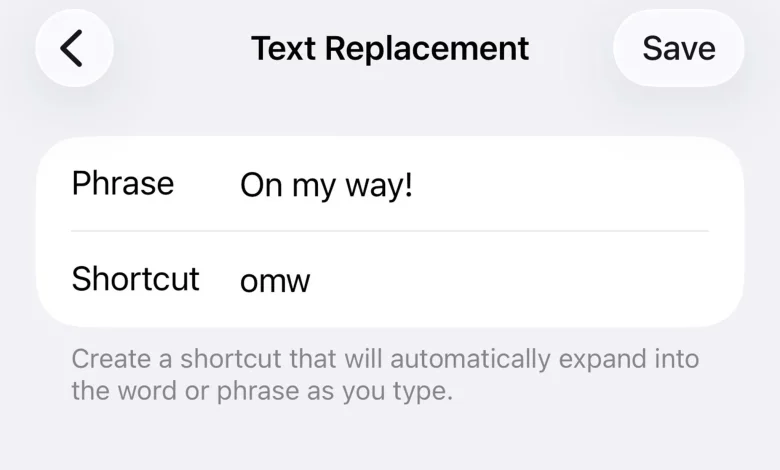
On an iPhone, the user does not have direct access to the list of words the phone has remembered while typing. However, you can change how autocorrect behaves via the text replacement feature. To do this, open “Settings”, select “General”, then “Keyboard” and tap “Text Replacement”. In the window, tap the “+” icon in the top right-hand corner, enter the correct spelling of the word in the “Phrase” field, and in the “Shortcut” field enter the version the phone keeps inserting incorrectly. Then save your changes.
If autocorrect is behaving too erratically and targeted tweaks do not help, you can completely reset the iPhone keyboard dictionary. To do this, in “Settings” go to “General”, select “Transfer or Reset iPhone”, then “Reset” and tap “Reset Keyboard Dictionary”. All learned words, personalised suggestions, saved shortcuts and abbreviations will be deleted, but other data on the phone will remain unaffected.
On Android smartphones, dictionaries are usually tied to a specific keyboard. In many cases, the user can view, add or edit words directly in the keyboard settings by opening the personal dictionary section or a similar menu item.
To keep the personal dictionary on Apple devices the same across all of a user's gadgets, you can synchronise it via iCloud. To do this, open “Settings”, tap your name at the top of the left-hand column, select “iCloud” and switch on “iCloud Drive”. After that, your keyboard's personal data will be updated on all compatible Apple devices.